Bank Loan Calculator
Estimate your monthly loan repayments and view a complete amortization schedule. Enter your loan amount, interest rate, and term below to get started.
Loan Details
| Month | Payment | Principal | Interest | Balance |
|---|
Bank Loan Calculator – Estimate Monthly Payments & Full Repayment Schedule
The Bank Loan Calculator is a smart and easy-to-use tool that helps you estimate your monthly loan payments and visualize your full loan amortization schedule. Whether you’re planning to take out a personal loan, auto loan, or business loan, this calculator helps you figure out how much you’ll pay each month — including interest — over the full loan term.
Using this bank loan calculator gives you instant clarity on your repayment plan, so you can make confident and informed financial decisions before signing any loan agreement.
To understand your repayment schedule better, LoanCalculatorBD provides a clear EMI breakdown.
How the Bank Loan Calculator Works
This calculator is based on the standard amortized loan formula. It divides your loan into equal monthly payments over the selected term, with a portion going to interest and the rest reducing the loan principal.
Formula Used:
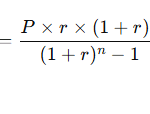
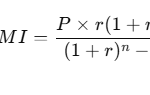
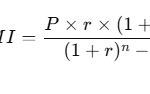
EMI = [P × R × (1 + R)^N] / [(1 + R)^N – 1]
Where:
- EMI = Monthly payment
- P = Principal loan amount
- R = Monthly interest rate (Annual Rate ÷ 12 ÷ 100)
- N = Total number of payments (Loan Term × 12)
Input Fields Explained:
- Loan Amount ($):
Enter the total amount you’re borrowing. For example,20000for a $20,000 loan. - Annual Interest Rate (%):
Enter the annual interest rate on your loan. For instance,6.5for 6.5%. - Loan Term (Years):
Enter the number of years over which you plan to repay the loan. For example,5.
Once all inputs are entered, click “Calculate Repayment Schedule” to instantly generate your monthly payment, total interest, total repayment, and a detailed amortization schedule.
Example Calculation – Verify with Real Inputs
Let’s walk through a real example to help you understand how the calculator works:
Sample Inputs:
- Loan Amount: $20,000
- Annual Interest Rate: 6.5%
- Loan Term: 5 years
Step-by-Step Breakdown:
- Monthly Interest Rate (R) = 6.5 ÷ 12 ÷ 100 = 0.005417
- Number of Payments (N) = 5 × 12 = 60
- Plug values into the formula:
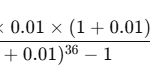
EMI = [20000 × 0.005417 × (1 + 0.005417)^60] / [(1 + 0.005417)^60 – 1]
Monthly Payment ≈ $391.32
Total Payment = $391.32 × 60 = $23,479.20
Total Interest = $23,479.20 – $20,000 = $3,479.20
What This Means:
If you take a loan of $20,000 at 6.5% interest for 5 years, you’ll pay about $391.32 every month, totaling $23,479.20 by the end of the loan term — with $3,479.20 going toward interest.
Benefits of Using This Calculator
- Instant Results: Get monthly payment estimates within seconds.
- Full Transparency: See the total interest and repayment breakdown.
- Amortization Schedule: View how much goes toward principal and interest each month.
- Smart Financial Planning: Evaluate different loan scenarios before making commitments.
- Free & Easy to Use: No signup or financial background required.
Tips and Common Mistakes
Helpful Tips:
- Try multiple interest rates and loan terms to see how it affects your monthly payment.
- Use the amortization schedule to plan for early repayments.
- Confirm your actual interest rate with the lender before comparing results.
Common Mistakes to Avoid:
- Using commas in numbers (e.g., 20,000): Input numbers without commas to avoid errors.
- Entering negative or zero values: Only positive, real numbers are accepted.
- Leaving fields blank: All input fields must be filled for the calculator to work.
- Assuming monthly interest rate is the same as annual: Always divide annual rate by 12 and convert to decimal.
Frequently Asked Questions (FAQs)
1. Is this calculator only for personal loans?
No. You can use it for any type of fixed-rate loan — including personal, business, auto, or student loans.
2. Does this include taxes, fees, or insurance?
No. This calculator estimates loan repayment only, excluding taxes or optional insurance fees.
3. Can I see a month-by-month breakdown?
Yes. The Amortization Schedule section shows how each payment is split into principal and interest, along with the remaining balance.
4. What if I make extra payments?
This calculator doesn’t account for extra payments, but making them can reduce your total interest and loan term.
5. Is this calculator accurate?
Yes, it uses the industry-standard formula used by banks and lenders. However, actual loan terms may vary based on lender policies.
Conclusion
The Bank Loan Calculator is a powerful tool for borrowers who want a clear view of their financial obligations. It not only shows your monthly payment but also breaks down total interest and repayment over the life of the loan.